Disclosure: Arabic Keyboard with English, our #1 pick, is associated with the publisher of this site. We included six other apps so you can compare fairly.
The short answer
- Best all-in-one: Arabic Keyboard with English. Harakat row, AI writing, translation, 100+ themes and three layouts.
- Best for simple everyday typing: Gboard. Familiar, fast and multilingual.
- Best for smart predictions: Microsoft SwiftKey. Learns the way you write.
In this guide
- Quick picks
- How we compared
- 1. Arabic Keyboard with English
- 2. Gboard
- 3. Microsoft SwiftKey
- 4. Transboard
- 5. Arabic Keyboard – Type Arabic
- 6. Easy Arabic AI Keyboard
- 7. Arabic Keyboard – AI Keyboard
- Feature comparison
- AI writing tools compared
- Find your keyboard
- How to install on Android
- What to look for
- FAQ
Finding the best Arabic keyboard for Android is no longer just about typing Arabic letters. Modern keyboard apps add smart predictions, AI writing help, translation, voice typing, Harakat (Tashkeel), themes and custom layouts.
Some apps focus on fast multilingual typing. Others specialize in translation, personalization or AI writing. A few combine everything in one keyboard.
In this guide, we compare seven Arabic keyboard apps for Android, look at their most useful features and help you pick the right one.
Best Arabic keyboard apps for Android: quick picks
| # | Keyboard app | Best for |
|---|---|---|
| 1 | Arabic Keyboard with English | All-in-one: AI writing, Harakat, themes and productivity tools |
| 2 | Gboard | Everyday multilingual typing |
| 3 | Microsoft SwiftKey | Smart predictions and personalized typing |
| 4 | Transboard | Translating while you chat |
| 5 | Arabic Keyboard – Type Arabic | Traditional Arabic typing and voice input |
| 6 | Easy Arabic AI Keyboard | AI writing and content creation |
| 7 | Arabic Keyboard – AI Keyboard | Fonts, emojis and 300+ themes |
How we compared these apps
We looked at each app's official Google Play listing and feature descriptions as of October 2026. We focused on what matters most for Arabic typing:
- How easy it is to type Arabic and switch to English
- Whether Harakat (vowel marks) are easy to reach
- AI writing, translation and voice typing
- Themes, layouts and other customization
- Extra tools, ads and privacy information
Features can change between versions, devices and regions, so check the Play Store listing before you install.
Arabic Keyboard with English
Best for: AI-powered Arabic and English typing, Harakat, themes, stickers and built-in productivity tools.
- Developer
- MHPartners
- Harakat row
- Yes, optional
- AI writing
- Yes
- Themes
- 100+
- Layouts
- Standard, Legacy, Compact
Arabic Keyboard with English combines traditional Arabic typing with AI writing help and lots of personalization. It's made for people who write in Arabic and English every day and want more than a basic keyboard.
Instead of jumping between separate apps for translation, rewriting, voice input and calculations, you get all of it inside the keyboard.
Try the Harakat row right here
Type كَيْفَ حَالُكَ below. Tap a letter, then a mark from the top row. This is a live demo of our free online keyboard, so you can feel how a dedicated Harakat row works.
Only in the app
The demo above shows typing and Harakat. These features need the app on your phone:
- AI rewrite & tone
- 100+ themes
- 3 keyboard layouts
- Arabic ↔ English translation
- Stickers & phrases
- Built-in calculator
- Smart suggestions
- Works in every app
Get it free on Google Play
Key features at a glance
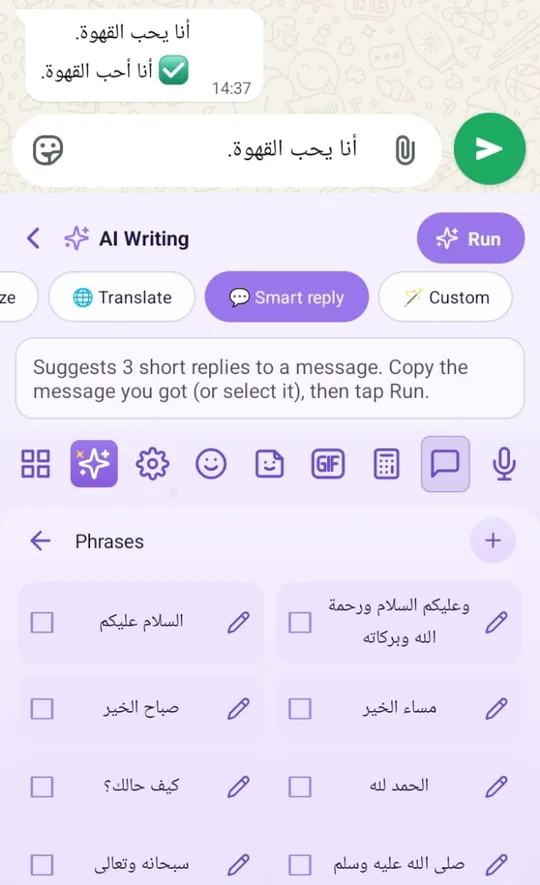
AI writing assistant for Arabic and English
Typing a message is the easy part. Making it clear, correct and polite takes more effort. The keyboard's AI tools help you improve a message before you send it.
- Grammar correction
- Spelling correction
- Text enhancement
- Paraphrasing
- Tone adjustment
- Text expansion
- Text shortening
- Text generation
- Smart replies
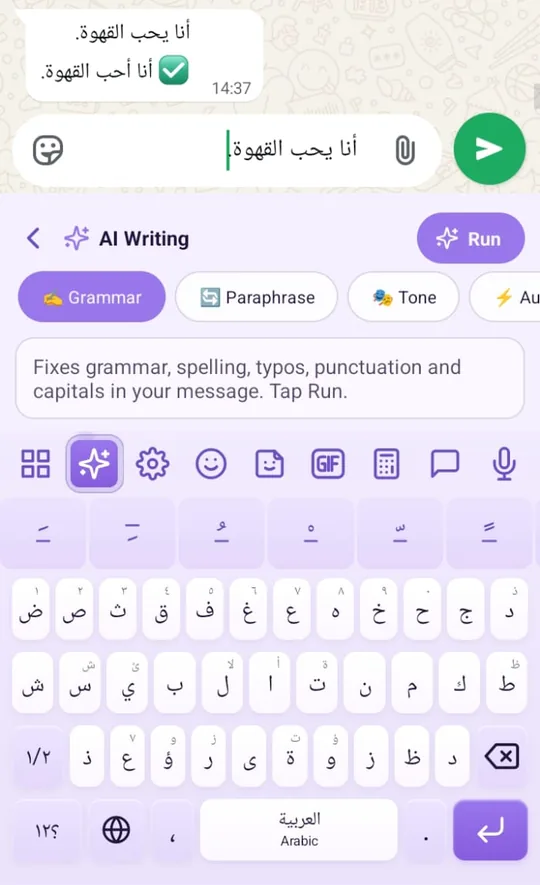
Grammar fixes “أنا يحب القهوة” to “أنا أحب القهوة” (I love coffee).
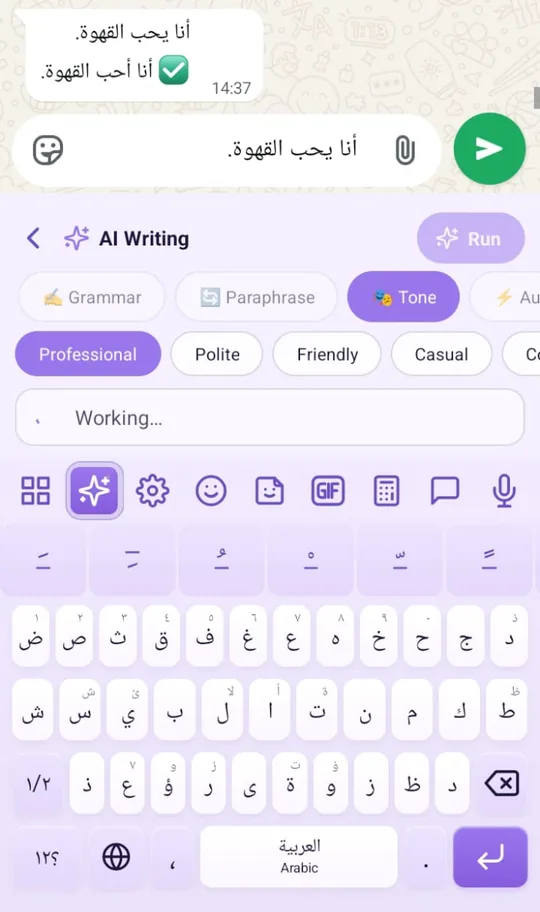
Tone rewrites your message as Professional, Polite, Friendly or Casual.
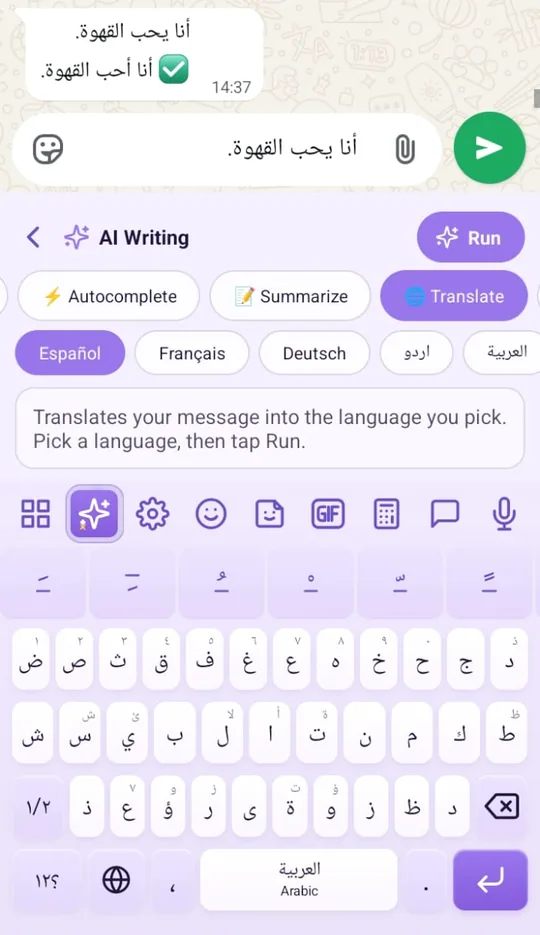
Translate turns your message into Spanish, French, German, Urdu, Arabic and more.
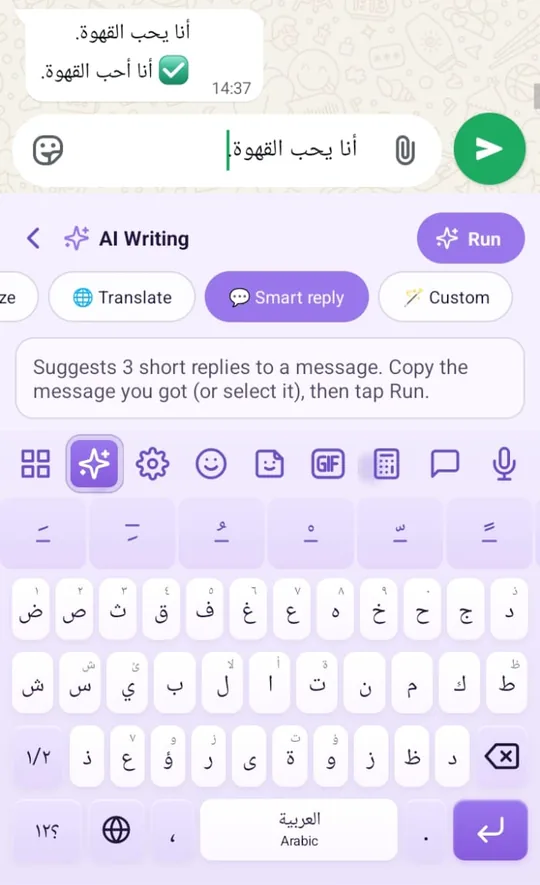
Smart reply suggests three short replies to a message you received.
These tools are especially useful for students, professionals and anyone who writes emails or social media posts in two languages.
Arabic keyboard with Harakat and Tashkeel
Harakat (also called Tashkeel) are the marks that show how Arabic words are pronounced. They matter for reading, learning and meaning.
The app has a dedicated Harakat row that you can turn on or off. It supports Fatha (َ), Kasra (ِ), Damma (ُ), Sukun (ْ), Shadda (ّ) and Tanween (ً ٍ ٌ).
كيف حالك
Tip: Keep the row off for everyday chat and turn it on for lessons, Quran study or pronunciation guides.
Arabic and English typing in one keyboard
You can switch between Arabic and English while you chat, write emails or browse. There's no need to install a separate keyboard for each language.
Message Arabic-speaking friends and English-speaking colleagues from the same familiar keyboard.
Smart suggestions and sentence completion
As you type, the keyboard suggests words, phrases and sentence endings. Common greetings and repeated messages take fewer taps.
It's handy for everyday chats, business messages, common Arabic expressions, emails and notes. A personal dictionary lets you save your own words.
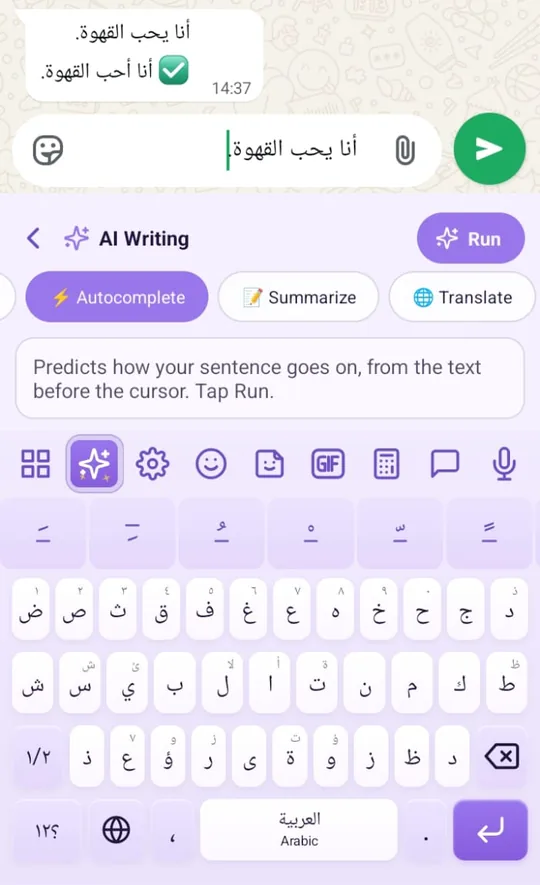
100+ keyboard themes
You see your keyboard all day, so its look matters. The app offers more than 100 themes: minimal, dark, light, gradient, luxury, Arabic-inspired, country flags, nature, and cute and colorful styles.
Advanced keyboard customization
Beyond ready-made themes, you can adjust colors, background images, key appearance, key size, spacing between keys and toolbar buttons. You can also turn the number row and Harakat row on or off.
You can choose between three layouts:
Arabic and English voice typing
Long messages take time to type. With voice typing, you can dictate in Arabic or English instead.
It's useful for longer messages, notes, emails, voice search, or when typing isn't comfortable. You can then polish the text with the AI tools.
Note: Voice accuracy depends on pronunciation, background noise, your device and the language you speak.
Arabic to English and English to Arabic translation
Translate typed or spoken text and drop the result straight into your conversation. The app also keeps a translation history and lets you copy translations.
Note: Automatic translation can miss context. Give important messages a quick check before you send them.
Want to try Arabic translation now? Use our free English to Arabic Translator.
Arabic stickers and custom expressions
Sometimes text isn't enough. The app includes stickers, ready-made phrases and expressions for greetings, celebrations, friendship, love, everyday reactions and emotions.
You can also make custom text and image stickers. WhatsApp sticker import is listed among its recent improvements.
Built-in calculator
Instead of leaving your chat to open a calculator, you can do the math inside the keyboard and insert the result. It supports standard and scientific calculations.
Clipboard, personal dictionary and privacy controls
Clipboard tools help you manage copied text, and the personal dictionary keeps your favorite words. Private Mode and other settings give you control over typing features.
According to its Google Play data safety section, the developer reports no data collection or third-party sharing. Still, review the current privacy policy, because AI, translation and voice features may need an internet connection.
Pros
- Complete Arabic and English typing
- Built-in AI writing and paraphrasing
- Dedicated, optional Harakat row
- 100+ themes and three layouts
- Detailed keyboard customization
- Voice typing and translation
- Stickers and custom expressions
- Standard and scientific calculator
- Smart suggestions and personal dictionary
Things to consider
- Some AI, translation and voice features need internet
- There are many settings to explore
- If you only need basic typing, you may not use every feature
Verdict: The best choice if you want Harakat, bilingual typing, AI rewriting, translation, stickers and a calculator in one keyboard.
Gboard – the Google Keyboard
Best for: fast everyday typing, multilingual chats and Google integration.
- Developer
- Translation
- Google Translate
- Voice typing
- Yes
- Glide typing
- Yes
Gboard is one of the most widely used Android keyboards. It's known for its clean design and huge language support, including Arabic.
- Multilingual typing: suggestions and corrections across your enabled languages, often without switching.
- Google Translate: translate while you write.
- Voice typing: dictate hands-free.
- Glide typing: slide your finger across the keys to type words.
- Predictions and autocorrect: fewer typing mistakes.
- Customization: themes and keyboard preferences.
Pros
- Clean, familiar design
- Huge language support
- Google Translate built in
- Voice and glide typing
- Helpful suggestions
Cons
- Less specialized for Arabic-focused users
- Fewer customization options than theme-focused apps
- Some features depend on language, device or Android version
Verdict: Great for straightforward, familiar typing. If you want Arabic-focused tools like a dedicated Harakat row and built-in utilities, look at a specialized keyboard.
Microsoft SwiftKey
Best for: adaptive autocorrect, multilingual chats and personalized typing.
- Developer
- Microsoft
- Languages
- 700+ (5 at once)
- AI writing
- Copilot tools
- Themes
- 100+
SwiftKey is a smart keyboard that adapts to the way you write. It supports Arabic and hundreds of other languages, and it's built around predictive text.
- Personalized predictions: suggestions learn your favorite words and phrases.
- Autocorrect: spelling fixes as you type.
- Swipe typing: type words by sliding across the keys.
- AI writing tools: Copilot features for rewriting, composing and changing tone.
- Multilingual: 700+ languages, up to five enabled at once.
- Themes: 100+ themes, photo backgrounds and adjustable size.
- Emojis, GIFs and stickers: for expressive chats.
Pros
- Predictions that adapt to you
- Strong multilingual support
- Swipe typing
- AI writing help
- Themes and layout options
- Lots of emojis and GIFs
Cons
- Can feel complex if you want a minimal keyboard
- Some AI and language features vary by region
- Not built specifically around Arabic
Verdict: Worth trying if predictions and personalized typing are your top priority.
Transboard – Keyboard Translate
Best for: people who chat across language barriers.
- Main focus
- Translation
- Voice input
- Yes
- Calculator
- Yes
- Ads / purchases
- Yes
Transboard is built around translating while you type. You don't need to copy text into a separate translator and paste it back.
- Instant translation while you write messages.
- Multilingual support through its translation system.
- Voice input for speaking instead of typing.
- Text decoration with decorative writing styles.
- Clipboard tools to copy, paste and save text.
- Themes and customization: key size, backgrounds, colors, vibration and keyboard height.
- Extras: recent updates mention better predictions, resizing and a calculator.
Pros
- Translation-first workflow
- Great for international chats
- Voice input
- Decorative text
- Clipboard and customization tools
- Built-in calculator
Cons
- Translation accuracy depends on languages and context
- More than you need for plain Arabic typing
- Has ads and in-app purchases, so check what's free
Verdict: A good fit if you translate messages often during conversations.
Arabic Keyboard – Type Arabic
Best for: straightforward Arabic typing, voice input and basic personalization.
- Main focus
- Arabic typing
- Voice typing
- Arabic
- Harakat
- Listed
- Glide typing
- Yes
This app focuses on a simple way to type Arabic on Android, with English switching and the everyday tools you'd expect.
- Arabic and English typing with quick switching.
- Arabic word predictions and autocomplete.
- Glide typing for supported words.
- Arabic voice typing to dictate messages.
- Translation for Arabic text.
- Themes and preferences: key sounds, vibration and suggestions.
Pros
- Arabic-focused typing
- Arabic and English switching
- Voice typing
- Predictions and autocomplete
- Themes and basic customization
Cons
- Less customization than theme-heavy keyboards
- Fewer AI writing tools
- Some reviews mention frequent ads
Verdict: Practical for typing Arabic messages, using voice input and changing the look, without a focus on AI.
Easy Arabic AI Keyboard Typing
Best for: AI help with writing, rewriting and emails.
- Main focus
- AI writing
- Translation
- 50+ languages
- Harakat
- Listed
- AI email
- Yes
This app pairs Arabic and English typing with a long list of AI writing features. It's built for people who want help composing text, not just typing it.
- AI grammar and spelling correction.
- Paraphrasing and rewriting for alternative versions.
- Tone changes: formal, polite, casual or professional.
- AI email writing and text summaries.
- AI text generation for different purposes.
- Translation into 50+ languages.
- Predictions, emojis, stickers and themes.
Pros
- Broad AI writing tools
- Grammar and spelling help
- Rewriting and tone changes
- Multilingual translation
- AI email writing
Cons
- Check whether AI features need internet or payment
- Review AI-written text for accuracy
- Fewer layout controls
Verdict: A strong option if you write lots of emails, posts or professional messages.
Arabic Keyboard – AI Keyboard
Best for: expressive messages, stylish text, themes and AI help.
- Main focus
- Themes & fonts
- Themes
- 300+
- Translation
- 50+ languages
- AI replies
- Yes
This keyboard mixes multilingual typing and AI writing with a strong focus on creative styling.
- AI grammar correction, rewriting and tone changes.
- AI replies and text summaries.
- Translation into 50+ languages.
- Multilingual typing in Arabic, English and more.
- Stylish fonts, emojis, GIFs and stickers.
- 300+ themes.
Pros
- Huge theme collection
- AI writing features
- Decorative fonts and emojis
- Many languages
- Rewriting and translation
Cons
- Check which features are free
- Lots of decoration if you prefer minimal
- Review AI and translation output
Verdict: Great if you want a colorful, expressive keyboard with AI on top.
Arabic keyboard apps: feature comparison
Tap the features you need. The apps that list all of them stay highlighted.
| Feature | Arabic Keyboard with English | Gboard | SwiftKey | Transboard | Type Arabic | Easy Arabic AI | Arabic AI Keyboard |
|---|---|---|---|---|---|---|---|
| Arabic typing | ✓ | ✓ | ✓ | ✓ | ✓ | ✓ | ✓ |
| English typing | ✓ | ✓ | ✓ | ✓ | ✓ | ✓ | ✓ |
| AI rewriting | ✓ | – | ✓ | – | – | ✓ | ✓ |
| AI grammar tools | ✓ | – | ✓ | – | – | ✓ | ✓ |
| AI tone changes | ✓ | – | ✓ | – | – | ✓ | ✓ |
| Translation | ✓ | ✓ | – | ✓ | ✓ | ✓ | ✓ |
| Voice typing | ✓ | ✓ | ✓ | ✓ | ✓ | – | – |
| Predictive typing | ✓ | ✓ | ✓ | ✓ | ✓ | ✓ | ✓ |
| Themes | ✓ | ✓ | ✓ | ✓ | ✓ | ✓ | ✓ |
| Layout customization | ✓ | ✓ | ✓ | ✓ | – | – | – |
| Stickers or GIFs | ✓ | ✓ | ✓ | – | – | ✓ | ✓ |
| Built-in calculator | ✓ | – | – | ✓ | – | – | – |
| Explicit Harakat support | ✓ | – | – | – | ✓ | ✓ | – |
| Personal dictionary | ✓ | – | – | – | – | – | – |
How to read this: ✓ means the feature appears in the app's official description. – means we couldn't confirm it, not that the app lacks it. General spell-check isn't the same as AI grammar rewriting, and Arabic support doesn't always mean a dedicated Harakat row.
AI writing tools compared
Four of the seven apps advertise AI writing help. Here's what each one lists.
| AI tool | Arabic Keyboard with English | SwiftKey | Easy Arabic AI | Arabic AI Keyboard |
|---|---|---|---|---|
| Grammar and spelling | ✓ | ✓ | ✓ | ✓ |
| Rewrite / paraphrase | ✓ | ✓ | ✓ | ✓ |
| Tone changes | ✓ | ✓ | ✓ | ✓ |
| Write from a prompt | ✓ | ✓ | ✓ | – |
| Expand text | ✓ | – | – | – |
| Shorten or summarize | ✓ | – | ✓ | ✓ |
| Smart replies | ✓ | – | – | ✓ |
| Email writing | – | – | ✓ | – |
Which Arabic keyboard should you choose?
Answer three quick questions to get a match.
| Your priority | Recommended app | Why |
|---|---|---|
| All-in-one Arabic keyboard | Arabic Keyboard with English | AI, Harakat, customization, translation and tools |
| Simple daily typing | Gboard | Familiar design and wide language support |
| Personalized predictions | SwiftKey | Adaptive suggestions and autocorrect |
| Translating while chatting | Transboard | Built around in-keyboard translation |
| Traditional Arabic typing | Type Arabic | Arabic input, voice typing and predictions |
| AI content help | Easy Arabic AI | Rewriting, grammar, email and content tools |
| Fonts, themes and expression | Arabic AI Keyboard | Creative styling plus AI tools |
Best Arabic keyboard with Harakat
If diacritics matter to you, start with Arabic Keyboard with English. Its optional Harakat row puts Tashkeel one tap away, which helps students, teachers and Arabic learners.
Best Arabic keyboard with AI
Arabic Keyboard with English, SwiftKey, Easy Arabic AI Keyboard and Arabic Keyboard – AI Keyboard all offer AI writing. Arabic Keyboard with English stands out if you also want Arabic-specific tools, layout options and built-in utilities.
Best Arabic keyboard for customization
Look at Arabic Keyboard with English, SwiftKey and Arabic Keyboard – AI Keyboard. Arabic Keyboard with English adds adjustable keys, spacing, backgrounds, toolbar controls and three layouts on top of its themes.
Best keyboard for Arabic to English communication
Gboard is great for mainstream multilingual typing, and Transboard focuses on translation. Arabic Keyboard with English combines translation with AI writing and other keyboard tools.
How to install an Arabic keyboard on Android
Setting up a new keyboard takes about a minute. Menu names can differ a little between phone brands.
- Install the appOpen Google Play, find the keyboard and tap Install.
- Turn it onOpen the app and follow its setup, or go to Settings → System → Languages & input → On-screen keyboard → Manage keyboards, and switch it on.
- Make it your keyboardChoose it as your default keyboard when the app asks, or tap the keyboard icon at the bottom of the screen while typing.
- Switch between Arabic and EnglishUse the globe key or the language key on the space bar.
Tip: Android may show a warning that a keyboard can collect what you type. This appears for every third-party keyboard. Install keyboards only from developers you trust, and read their privacy policy.
What to look for in an Arabic keyboard
Accurate Arabic typing
Letters that are easy to reach, in a layout that matches your habits.
Arabic and English switching
Quick switching makes bilingual chats much easier.
Harakat support
A dedicated, optional row helps learners and teachers most.
Smart predictions
Suggestions save taps, though quality varies by language.
AI writing help
Grammar fixes, rewriting and tone for emails and posts.
Customization
Themes, key size, height, spacing, number row and layouts.
Translation and voice
Translate across languages and dictate long messages.
Privacy and permissions
Check permissions, the privacy policy and the Data safety section.
Keyboards can see sensitive text, so privacy matters. Features that use cloud AI or translation may process your text online, unlike ordinary typing on your device.
Want to practice typing Arabic first? Try our free online Arabic keyboard or the Arabic Diacritics tool.
Frequently asked questions
What is the best Arabic keyboard for Android in 2026?
It depends on your needs. Arabic Keyboard with English is our featured all-in-one pick, with Arabic and English typing, AI writing tools, Harakat, translation, themes and productivity features. Gboard and SwiftKey are strong choices for general multilingual typing.
Which Arabic keyboard supports Harakat?
Arabic Keyboard with English has a dedicated, optional Harakat row. Some other Arabic keyboards also list diacritic support, but the way you enter the marks can differ.
Can I type in Arabic and English with one keyboard?
Yes. All seven apps in this guide support Arabic and English, or wider multilingual typing.
Is there an Arabic keyboard with AI grammar correction?
Yes. Arabic Keyboard with English includes grammar correction, paraphrasing and tone adjustment. SwiftKey and several AI-focused Arabic keyboards also offer writing help.
Can I translate Arabic to English directly from my keyboard?
Yes. Arabic Keyboard with English, Gboard and Transboard all offer translation inside the keyboard. Supported languages and features differ by app.
Which Arabic keyboard has the most themes?
Theme counts change over time. Among the apps here, Arabic Keyboard – AI Keyboard lists 300+ themes, while Arabic Keyboard with English and SwiftKey each list 100+. The best collection depends on your taste, not just the number.
Can I use voice typing in Arabic?
Yes. Arabic Keyboard with English, Gboard and Arabic Keyboard – Type Arabic all offer voice typing. Accuracy depends on your device and language settings.
Is it safe to use a third-party Arabic keyboard?
It can be. Check the developer's privacy policy, permissions and data handling. Install keyboards only from trusted sources like Google Play, keep them updated, and review how AI and online features handle your text.
Can I customize the Arabic keyboard layout?
Some keyboards let you change size, key arrangement and other settings. Arabic Keyboard with English offers Standard, Legacy and Compact layouts, plus appearance and spacing controls.
Can I use an Arabic keyboard in WhatsApp, Instagram and other apps?
Yes. Android keyboards work in any app that uses standard text input. Stickers, media and special formatting may work differently from app to app.
Try Arabic Keyboard with English
Type Arabic and English with AI writing tools, a Harakat row, themes, voice typing, translation and more, in every app on your phone.
- AI writing for better messages
- Harakat row one tap away
- 100+ themes and 3 layouts
Download on Google Play
Editorial disclosure: Arabic Keyboard with English is a featured app associated with the publisher of this article. Competing apps are included to help you compare. Feature information is based on publicly available app descriptions as of October 2026. Actual features may vary by version, device and region.